
 Help me choose
A robot cleans whatever is under it. The hard part is getting under everything. Poor navigation looks like this: a spotless stripe down the middle of the pool, a dusty crescent behind the ladder, and the same corner missed three days running. If you want the best robotic pool cleaner with navigation that earns the word smart, judge it by how evenly the floor is cleaned, not by how quickly the robot finishes.
One clarification before the ranking, because the marketing around this feature runs ahead of the hardware. None of the robots Pool Express ranks here maps your pool with cameras or sonar, and none draws a floor plan on your phone. They navigate by scanning patterns and motion sensors, and our Pool Pros rank them by the sensors each one publishes.
Five Robots Ranked on How They Find Their Way
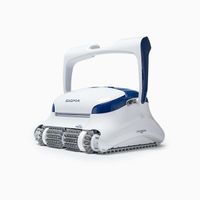
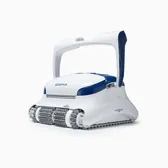
The spec that wins is SmartNav 3.0 with an onboard gyroscope, the highest navigation tier among the Dolphins in this guide. The gyroscope reports which way the robot is facing and how it is tilted, so it can hold straight passes, tell floor from wall from slope, and pick its line back up after a ladder or drain knocks it off. A 360-degree anti-tangle swivel keeps the 55 ft cable from undoing that work. The catch: you pay the highest price here for it, and in a plain rectangle the advantage shrinks.
Best for
Freeform, kidney and obstacle-heavy in-ground pools up to 50 ft where robots have missed patches before.
Keep in mind
Highest-priced pick, and 24.6 lb to lift. In a simple rectangle a lower pick may cover just as evenly.
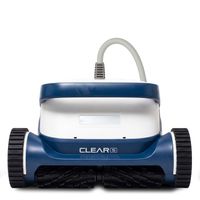
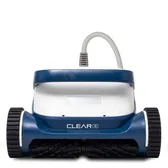
The winning line is a gyroscope and an accelerometer working together: one tracks turning, the other tracks movement and tilt. The specification says coverage tightens after 2 to 3 cycles, so judge it on the third run, not the first. It also offers something no Dolphin here does: manual joystick driving from the Clear app, so a missed patch can be dealt with directly. The catch: that settling-in period is real, and an early cycle in a new pool may look less tidy than later ones.
Best for
In-ground pools up to 50 ft with odd shapes, and owners who want to steer the robot to a spot themselves.
Keep in mind
Allow 2 to 3 cycles before judging coverage. Check the live price on the card.

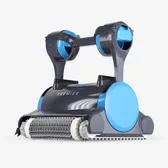
The spec is SmartNav 2.0 scanning, the system most Dolphins in this guide share, and the Premier gives it the strongest supporting cast. It is the one robot here whose published shapes include L-shaped pools alongside rectangle, oval and freeform. A 360-degree anti-tangle swivel stops cable twist from pulling it off pattern, and a 3-hour cycle, the longest of the Dolphins on this page, gives the scan more time to reach the whole floor. The catch: on a very irregular floor, the two picks above have more sensors to steer by.
Best for
Large rectangles, ovals and L-shaped pools up to 50 ft with a long cable run.
Keep in mind
Scanning navigation only, and every control is on the power supply. See the live price on the card.
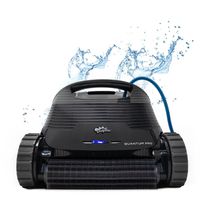
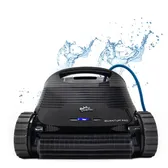
The spec is SmartNav 2.0 scanning that senses ladders and drains, two fittings that commonly interrupt a cleaning pattern. The Quantum also has the longest coverage list of the Dolphins here: floor, walls, waterline, sun shelves, Baja ledges and stairs. An anti-tangle swivel on a 55 ft cable protects the pattern, and it is the lowest-priced 50 ft robot in this guide. It sits one place below the Premier because its published shapes stop at rectangle, oval and freeform and its cycle is an hour shorter. The catch: scanning only, and a 2-year warranty.
Best for
Pools up to 50 ft with ladders, a main drain, a tanning ledge or steps to work around.
Keep in mind
Not the pick for the most irregular shapes; the first two robots carry more sensing.

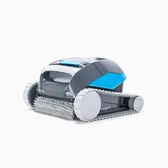
The spec is the same SmartNav 2.0 scanning found on the Premier and Quantum, in a 14.6 lb robot for pools up to 33 ft. A smaller pool has less floor to lose track of, and scanning navigation covers rectangle, oval and freeform shapes, in-ground or above-ground, in a 2-hour cycle. Published obstacles include steps, ladders, drain covers and ledges. It ranks fifth for one practical reason: the 50 ft cable has no swivel, so in a pool with many turns the cable can twist and tug the robot off its pattern.
Best for
Pools up to 33 ft with a regular shape, where price matters more than sensors.
Keep in mind
No swivel and no waterline cleaning. Lay the cable out straight between runs.
Free Shipping30-Day Trial: use it in your pool, return it within 30 days of deliveryLow Price GuaranteeAuthorized dealer with the full manufacturer's warrantyInstallment options, when offered, appear at checkout
What Good Navigation Looks Like
-
Sensors on Board
Published hardware is the fairest comparison. The Sigma adds an onboard gyroscope to SmartNav 3.0. The Clear S uses a gyroscope and an accelerometer. The other three robots here run SmartNav 2.0 scanning. More sensing means better awareness of heading and tilt.
-
Your Pool's Shape
A rectangle forgives simple navigation: straight passes, square turns. Freeform curves, an L-shaped leg or the waist of a kidney give a robot more chances to lose its line. The more irregular the pool, the more the navigation tier matters.
-
Obstacles in the Way
Ladders, main drains, steps and pop-up heads interrupt a pattern. What matters is how the robot gets back on course afterward. The Quantum's SmartNav 2.0 is described as sensing ladders and drains. A gyroscope helps a robot recover its heading after a bump turns it.
-
The Cable
Navigation is only as good as the cable allows. A twisted cable drags the robot off line and shortens its reach. The Sigma and Premier have a 360-degree anti-tangle swivel, the Quantum an anti-tangle swivel, the Clear S an anti-tangle cable. The Cayman's cable has none.
Navigation and Cable Specs Compared
| Specification |
Dolphin Sigma
Top pick
|
Clear S
Pick 2
|
Dolphin Premier
Pick 3
|
Dolphin Quantum
Pick 4
|
Dolphin Cayman
Pick 5
|
|---|---|---|---|---|---|
| Price today | $2,349 | $1,749 | $1,949 | $1,599 | $1,049 |
| Cleans | Floor, walls and waterline | Floor, walls and waterline | Floor, walls and waterline | Floor, walls, waterline, sun shelves and stairs | Floor and walls |
| Scheduling | Weekly scheduler by day and time | Weekly schedules in the Clear app | Weekly timer: every day, every 2 days or every 3 days | Weekly timer: every day, every 2 days or every 3 days | Timer: every day |
| App | myDolphin Plus (Wi-Fi and Bluetooth) | Clear app (iOS and Android) | No app; controls on the power supply | myDolphin Plus (Wi-Fi) | No app; controls on the power supply |
| Filtration | NanoFilters and standard filter cartridges | UltraFilter basket: 1-micron fine and 180-micron coarse panels | Multi-Media: NanoFilters, oversized leaf bag and standard fine filters | XXL MaxBin basket with standard and NanoFilter panels | MaxBin basket with fine panels; NanoFilter panels optional |
| Brushes | Quad scrubbing brushes | Front and rear active brushes | Dual scrubbing brushes | Dual HyperBrush | HyperBrush |
| Navigation | SmartNav 3.0 with gyroscope | Gyroscope and accelerometer | SmartNav 2.0 | SmartNav 2.0 | SmartNav 2.0 |
| Cable | 55 ft with 360° anti-tangle swivel | 59 ft anti-tangle | 55 ft with 360° anti-tangle swivel | 55 ft with anti-tangle swivel | 50 ft |
| Warranty | 3 years | 3 years (limited) | 3 years | 2 years | 2 years |
| Buy | See priceDetails | See priceDetails | See priceDetails | See priceDetails | See priceDetails |
Specifications are the manufacturers' published figures. Prices are live from our store.
What Smart Navigation Is, and Is Not
Smart navigation on a pool robot means the machine follows a deliberate pattern instead of bouncing at random, and uses sensors to keep that pattern honest. Scanning systems such as SmartNav 2.0 work the pool in organized passes. Adding a gyroscope, as SmartNav 3.0 and the Clear robots do, lets the robot know its heading and tilt, so it can correct itself.
It does not mean the robot sees. None of these robots uses cameras or sonar, builds a map you can view, or shows where it has been. None will recognize a toy on the floor or steer around a swimmer. And smarter does not mean faster: a cycle runs its set time however the robot steers.
How to Judge Coverage in Your Own Pool
The test is simple and needs a dirty floor. Let a visible layer of dust settle, run one full cycle, and look before anyone swims.
- Clean stripes with dusty ones between: the pattern is being pulled off line. Check for a twisted cable first.
- One corner or the patch behind a ladder missed every time: move the power supply so the cable enters from another side, then test again.
- A Clear robot on its first run: wait. Its coverage is stated to tighten after 2 to 3 cycles.
- Top steps and shallow ledges left alone: that is a coverage limit, not a navigation fault.
Things That Defeat Good Navigation
Most complaints about a robot that cannot find its way have nothing to do with its sensors. A cable with twists stored in it shortens the robot's reach and drags it sideways. A filter loaded with debris weakens the water flow that helps a robot stay planted on walls, so it slides off line. Strong return jets can push a light robot around. A deep liner wrinkle or a raised drain cover can stop one outright.
Fix those before blaming the navigation or paying for a higher tier. Our team would sooner help you sort out a cable than sell you a second robot: Ask a Pool Pro.
Pool Pro Tips for Even Coverage
- Pool Pro tip: set the power supply near the middle of the pool's long side, at the distance from the water the manual gives. The cable then reaches both ends without a long diagonal.
- Pool Pro tip: every few cycles, unplug the cable, lay it out straight on the deck and let the stored twists relax before the next run.
- Aim strong return jets downward or away from the walls during a cycle if they keep pushing the robot off its climb.
Navigation Questions
Do robotic pool cleaners map the pool?
Not the ones in this guide. None uses cameras or sonar or stores a floor plan you can see. They follow scanning patterns, and the Sigma and Clear S add motion sensors to hold their heading. The Clear specification notes that coverage tightens after 2 to 3 cycles, which is the robot settling in.
Is a robotic pool cleaner with navigation worth paying more for in a rectangular pool?
Every robot here has navigation of some kind; the question is which tier. In a plain rectangle, SmartNav 2.0 scanning covers the floor well, and the money is better spent on filtration or coverage. Pay for extra sensors when the shape or the obstacles make straight passes hard.
Why does my robot keep missing the same spot?
Usually the cable or the starting position, not the sensors. A twisted cable, or a power supply placed at one far end, limits where the robot can reach. Straighten the cable, move the power supply toward the middle of the long side, and run a test cycle on a dusty floor.
Can I steer a robot to a spot it missed?
On the Clear S and Clear UV, yes: the Clear app includes manual joystick driving. None of the Dolphins in this guide has a handheld remote. With those, place the robot near the missed area and start a cycle, or simply let the next scheduled run take another pass.
Which Navigation Tier to Buy
Match the sensors to the shape. Curves, a ladder and a drain in the way: the Sigma, or the Clear S if steering it yourself appeals. A big regular pool or an L-shape: the Premier's scanning and swivel. Ladders and ledges on a budget: the Quantum. A simple pool up to 33 ft: the Cayman. Then give it a straight cable and a clean filter; no sensor makes up for a tangle. See the live price on each card.
How we pick and how we earn: Pool Express is an authorized dealer and sells every robot recommended in this guide. Picks are ranked for this pool or problem from each robot's published specifications. Prices shown are pulled live from our store and may change. Last updated November 23, 2026.