
 Help me choose
Most people searching for the best robotic pool cleaner with Bluetooth have the same problem: the router is in the house, the outlet is out by the equipment pad, and the Wi-Fi signal gives up somewhere around the patio door. A Bluetooth link solves that by letting the phone talk straight to the robot's power supply, a few steps away, with no router in the middle.
Here is the honest state of the shelf at Pool Express. Of the seven robots compared in these guides, one publishes Bluetooth: the Sigma. The Quantum has app control over Wi-Fi. The Premier, Cayman and Escape have no wireless control at all, and the Clear app's connection type is not stated in its published specification, so the Clear S and Clear UV are not listed as Bluetooth robots. A two-robot page is the accurate one.
Our Bluetooth Shortlist, in Order
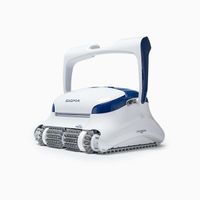
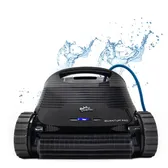
The winning spec is on the connectivity line: myDolphin Plus over Wi-Fi and Bluetooth. Pair the phone poolside over Bluetooth even when the house router cannot reach the pad, then add Wi-Fi if you want control from somewhere else. The app carries a weekly scheduler by day and time, a filter alert and Siri voice control.
The robot behind the app is the most heavily equipped Dolphin in this guide: three commercial-grade ProLine motors moving 4,500 GPH, quad scrubbing brushes, SmartNav 3.0 with an onboard gyroscope, and a 2.5-hour cycle over floor, walls and waterline in pools up to 50 ft. The catch is cost and heft: it tops the price range here and weighs 24.6 lb.
Best for
In-ground pools up to 50 ft where Wi-Fi is weak at the outlet, and owners who want phone and voice control.
Keep in mind
The highest-priced pick here, and its scheduling runs through the app instead of a dial on the power supply. Check the live price on the card.
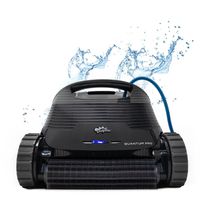
Be clear about what wins here: Wi-Fi, not Bluetooth. The Quantum's myDolphin Plus app runs over Wi-Fi and handles start, stop, scheduling, cleaning modes and alerts, which covers what most owners want from a phone. Its spec sheet does not list Bluetooth, so we do not claim it.
It earns second place because it has a safety net no app can offer: a timer on the power supply that works with no phone and no signal. Add dual HyperBrush scrubbing, the XXL MaxBin basket, a 2-hour cycle and coverage of sun shelves, Baja ledges and stairs, and it is the lowest-priced 50 ft robot in this guide. The catch: where Wi-Fi does not reach the power supply, the app is of little use.
Best for
Owners with solid Wi-Fi at the power supply who want app scheduling plus a timer that works without a phone.
Keep in mind
Not a Bluetooth robot on its published spec, and its warranty runs 2 years where the first pick carries 3.
Free Shipping30-Day Trial: use it in your pool, return it within 30 days of deliveryLow Price GuaranteeAuthorized dealer with the full manufacturer's warrantyInstallment options, when offered, appear at checkout
What to Know Before You Pay for Bluetooth
-
What the Phone Connects To
Radio fades quickly in water, so the phone does not talk to the robot on the pool floor. It talks to the power supply on the deck, and the power supply talks to the robot down the cable. Where the power supply sits, and how close you stand to it, decides whether the link holds.
-
Range: Poolside, Not Across Town
Bluetooth is a short-range link. It suits pairing, set-up and control while you are standing in the yard. It will not start a cycle from the office or the airport; that takes Wi-Fi at the power supply and a working internet connection. Decide which job you are buying for.
-
What the App Does Once Connected
A wireless link is only as useful as the app behind it. On the Sigma that is a weekly scheduler by day and time, a filter alert and Siri voice control. On the Quantum it is start, stop, scheduling, cleaning modes and alerts. Neither app lifts the robot out or empties the filter.
-
A Fallback With No Phone
Phones get replaced and apps get logged out. The Quantum also carries a timer on the power supply (every day, every 2 days or every 3 days) that runs with no phone and no Wi-Fi. The Sigma's weekly scheduler is set in the app. If a house sitter or relative will run the robot, that difference matters.
Sigma and Quantum Side by Side
| Specification |
Dolphin Sigma
Top pick
|
Dolphin Quantum
Pick 2
|
|---|---|---|
| Price today | $2,349 | $1,599 |
| Cleans | Floor, walls and waterline | Floor, walls, waterline, sun shelves and stairs |
| Scheduling | Weekly scheduler by day and time | Weekly timer: every day, every 2 days or every 3 days |
| App | myDolphin Plus (Wi-Fi and Bluetooth) | myDolphin Plus (Wi-Fi) |
| Filtration | NanoFilters and standard filter cartridges | XXL MaxBin basket with standard and NanoFilter panels |
| Brushes | Quad scrubbing brushes | Dual HyperBrush |
| Navigation | SmartNav 3.0 with gyroscope | SmartNav 2.0 |
| Cable | 55 ft with 360° anti-tangle swivel | 55 ft with anti-tangle swivel |
| Warranty | 3 years | 2 years |
| Buy | See priceDetails | See priceDetails |
Specifications are the manufacturers' published figures. Prices are live from our store.
Bluetooth Versus Wi-Fi at the Pool
The two links do different jobs, and mixing them up is a common source of disappointment with app-controlled robots. Bluetooth is a direct conversation between phone and power supply: no router, no network password, no internet, and a range measured in steps. Wi-Fi puts the power supply on the home network, which is what lets a command reach it when you are not in the yard.
Neither link reaches the robot itself. Everything passes through the power supply and down the cable. The table sets out what each connection is for.
| Question | Bluetooth | Wi-Fi |
|---|---|---|
| Needs the home router? | No | Yes |
| Works standing poolside? | Yes | Yes, if the signal reaches the power supply |
| Works away from home? | No | Yes, with a working internet connection |
| Typical job | Pairing, set-up, poolside control | Scheduling and control from anywhere |
| Listed on the spec sheet of | Sigma | Sigma and Quantum |
Check the Signal Where the Power Supply Will Sit
Before choosing between these two, do a two-minute survey. Find the outdoor outlet the robot will use. The power supply has to sit back from the water's edge by the distance its manual gives, so the real spot may be nearer the house than you expect. Stand on that spot with your phone and read the result against this list.
- Strong Wi-Fi: either robot will connect. Choose on price, coverage and warranty.
- One bar, or a signal that drops: the Sigma's Bluetooth pairing is the dependable route, or plan a Wi-Fi extender for the Quantum.
- No signal at all: Bluetooth gives poolside control on the Sigma, and the Quantum falls back to its power-supply timer.
Why Five Other Robots Are Not on This Page
Leaving robots off is part of an honest shortlist. The Premier, Cayman and Escape have no app and no wireless link of any kind: the Premier and Cayman run from controls and a timer on the power supply, and the Escape starts at its power supply, with an Automation Timer as an optional upgrade. For plenty of owners that is the better arrangement, with nothing to pair or update.
The Clear S and Clear UV do have an app, with weekly schedules, manual joystick driving and live pool temperature. What the published Clear data leaves out is whether it connects over Bluetooth or Wi-Fi, so we list them in other guides. If the Clear app is why you are shopping, Ask a Pool Pro and our team will confirm the connection for your setup.
What Wireless Control Does Not Change
A Bluetooth or Wi-Fi robot is still a corded machine: the Sigma and Quantum both plug into a standard outlet through a power supply and work on a 55 ft cable with an anti-tangle swivel. The app replaces buttons, not the cord.
It does not replace the chores either. Someone still lifts the robot out to empty and rinse the filter, at least weekly and more in leaf season, and takes it out before shocking the pool. No app tops up sanitizer or skims the surface. Buy the robot for how it cleans, and treat the phone as a switch and a calendar.
Pool Pro Tips for App-Controlled Robots
- Pool Pro tip: pair the phone while standing next to the power supply, not from the kitchen. Short-range links are happiest at short range, and set-up is the moment they matter most.
- Pool Pro tip: switch on Bluetooth in the phone's settings and accept the app's permission prompts before you begin. A refused permission is an easy way to stall pairing.
- Buying the Quantum for a pad with patchy Wi-Fi? Set its power-supply timer on day one, so cleaning continues whether or not the app connects.
Bluetooth Pool Robot Questions
Which robotic pool cleaner with Bluetooth works when Wi-Fi does not reach the pool?
The Dolphin Sigma. Its myDolphin Plus app connects over Bluetooth as well as Wi-Fi, so a phone can pair with the power supply poolside without the home router being involved. It is the one robot in this guide with Bluetooth on its published spec sheet.
Does Bluetooth reach the robot when it is underwater?
No, and it does not need to. Radio signals fade quickly in water, so the phone connects to the power supply sitting on the deck, and the power supply passes commands to the robot through the cable. Stay within short range of the power supply, not the robot, and the link holds.
Does the Dolphin Quantum have Bluetooth?
Its published spec lists Wi-Fi for the myDolphin Plus app and does not list Bluetooth, so we do not claim it. Over Wi-Fi the app starts and stops cycles, sets schedules, changes cleaning modes and sends alerts. The Quantum also has a timer on the power supply that works with no phone at all.
Is a Bluetooth pool robot cordless?
No. Bluetooth replaces the buttons, not the power cord. Every robot in this guide is corded: each one plugs into a standard outlet through a power supply and cleans at the end of a cable. The wireless part is the conversation between your phone and that power supply.
Do the Clear S and Clear UV connect by Bluetooth?
We cannot say, so we do not list them here. Both run from the Clear app for iOS and Android, with weekly schedules, manual joystick driving and live pool temperature, but the specifications we work from do not state the wireless type. Ask a Pool Pro before buying if the connection method matters to you.
The Decision Rule
If the word Bluetooth is the requirement, the decision is made: the Sigma is the robot in this guide that publishes it, and it brings Wi-Fi along for the days you are away. If what you want is a phone app and your Wi-Fi reaches the power supply, the Quantum delivers that for less and keeps a no-phone timer in reserve. If the signal survey comes back empty, a timer-run robot is a sound answer. See the live price on each card.
How we pick and how we earn: Pool Express is an authorized dealer and sells every robot recommended in this guide. Picks are ranked for this pool or problem from each robot's published specifications. Prices shown are pulled live from our store and may change. Last updated November 23, 2026.